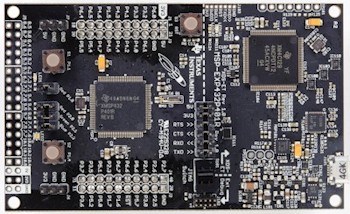
The MSP-EXP432P401R LaunchPad Development Kit
Pre-configured MSP432 projects that target the MSP432P401R Launchpad Development Kit are provided for each of the following three ARM Cortex-M4 compilers:
The comprehensive demo uses FreeRTOS+CLI to create a simple command line interface through a UART.
The blinky demo uses FreeRTOS's tickless idle mode to reduce power consumption.
Note that only the generic ARM Cortex-M tickless implementation is demonstrated, which prevents any of the advanced MSP432 low power modes from being entered, and therefore does not get close to demonstrating the power saving that could otherwise be achieved.
FreeRTOS is designed to allow the generic tickless mode to be overridden by an application specific implementation. Providing a target specific tickless implementation allows the RTOS tick interrupt to be generated from a low power clock, instead of the ARM Cortex-M SysTick clock. The application writer can then tailor the implementation to be specific to the application through the use of pre and post sleep macros. Tailoring a tickless implementation specifically to the MSP432 will allow significantly greater power savings to be achieved.
See the Low Power Support and the Low Power RTOS For ARM Cortex-M MCUs pages for further information.
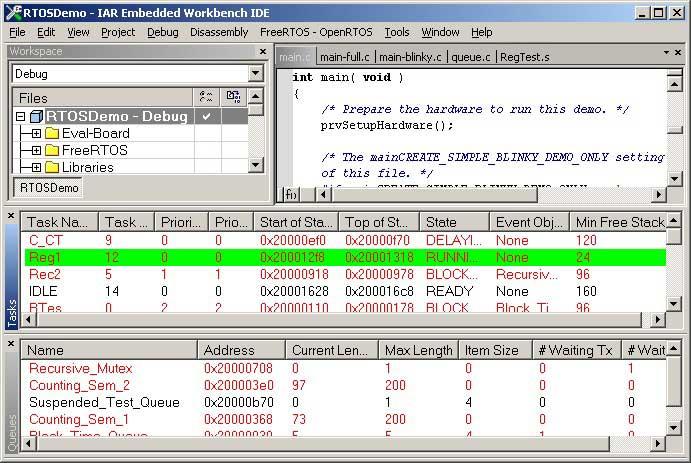
See also the FAQ My application does not run, what could be wrong?
The IAR, Keil uVision and CCS projects are all located in the /FreeRTOS/Demo/CORTEX_M4F_MSP432_LaunchPad_IAR_CCS_Keil directory:
The RTOS demo projects can be configured to build either a simple blinky project that also demonstrates FreeRTOS's generic tickless low power mode, or a comprehensive test and demo application. The constant configCREATE_SIMPLE_TICKLESS_DEMO, which is defined at the top of the projects' FreeRTOSConfig.h file, is used to switch between the two.
Note the comments at the top of this page about the difference in power saving that can be achieved by the demonstrated generic tickless implementation when compared to what could be achieved using an MSP432 specific tickless implementation.
The demo uses an LED built onto the Launchpad development kit, so no hardware setup is required.
The following sub-sections provide instructions on using each of the ARM Cortex-M4 toolchains.
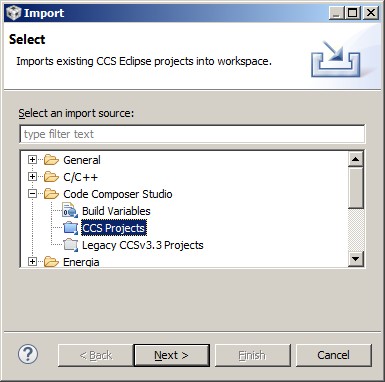
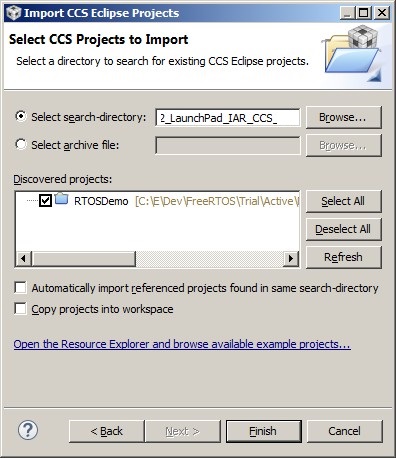
Note 1: The projects for all the compilers are contained in the same directory within the FreeRTOS .zip file download. Code Composer Studio (CCS) will fail to build the project if the directory already contains object files that were generated by a different compiler. It is necessary to delete all intermediary files from the directory, and its sub-directories, before it is possible to switch to using the Code Composer Studio project after either the IAR or uVision projects have already been used.
Note 2: The CCS project references files using relative paths, including FreeRTOS+CLI files from the /FreeRTOS-Plus directory. The project may fail to build if a directory path is changed or if a file is moved. Eclipse's 'export' features can be used to convert the project into a stand-alone project that only uses directories under the directory in which the .project file is located.
The FreeRTOS tickless idle mode stops the periodic RTOS tick interrupt during idle periods (periods when there are no application tasks that are able to execute). The blinky example creates two tasks that only unblock once every second, so the tick interrupt is stopped for the majority of the execution time.
Stopping the RTOS tick interrupt allows the microcontroller to remain in a deep power saving state until either an interrupt occurs, or it is time for the RTOS kernel to transition a task into the Ready state.
Note the comments at the top of this page about the difference in power saving that can be achieved by the demonstrated generic tickless implementation when compared to what could be achieved using an MSP432 specific tickless implementation.
Setting configCREATE_SIMPLE_TICKLESS_DEMO to 1 results in main() calling main_blinky():
main_blinky() creates a queue, a queue send task, and a queue receive task, before starting the scheduler.
The queue send task is implemented by the prvQueueSendTask() function in main_blinky.c.
prvQueueSendTask() sends the value 100 to the queue every second.
The queue receive task is implemented by the prvQueueReceiveTask() function in main_blinky.c.
prvQueueReceiveTask() blocks to wait for data to arrive on the queue. Each time the value 100 is received from the queue it flashes the LED. As data is sent to the queue every second, the LED will flash every second.
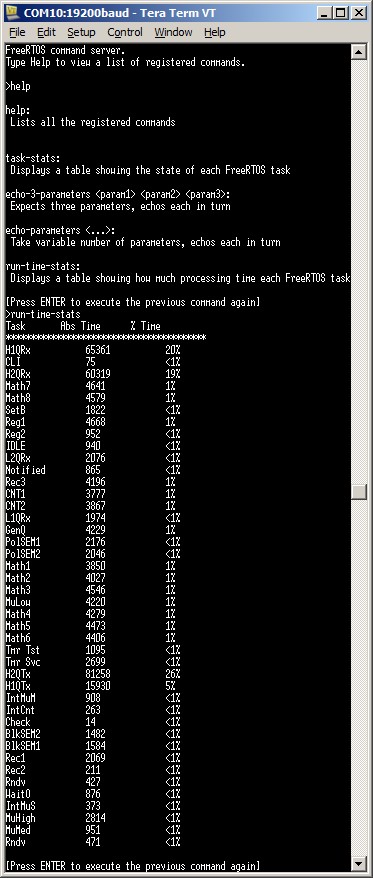
The comprehensive demo includes a command line interface (CLI) on which both task and run-time statistics can be viewed. Instructions on connecting to and using the CLI are provided below.
Setting configCREATE_SIMPLE_TICKLESS_DEMO to 0 results in main() calling main_full():
main_full() creates a set of standard demo tasks, the CLI, the Check task, the Register Test tasks, and starts the scheduler.
The reg test tasks test the context switching mechanism by filling each MCU register with a known value, then continuously checking that each register maintains its expected value for the lifetime of the task.
The "Check" task monitors the status of all the other tasks in the system, looking for a task either stalling or reporting an error. It toggles an LED each time it is called.
If the LED is toggling every three seconds then the check task has determined the demo is running as expected. If the LED is toggling every 200ms then at least one error has been found.
To connect to the CLI:
The lowest priority on a ARM Cortex-M core is in fact 255 - however different ARM Cortex-M microcontroller manufacturers implement a different number of priority bits and supply library functions that expect priorities to be specified in different ways. For example, the TI MSP432 ARM Cortex-M4 microcontrollers implements 3 priority bits, which allows for a maximum of 8 different priority levels (0 to 7 inclusive). The lowest priority being the highest number. Some library functions will use the numeric value 7 as the lowest priority, while others will use the numeric value 224 as the lowest (which is 7 << 5, and how the ARM Cortex-M sees the value internally in the interrupt controller). These two numbers are defined by configLIBRARY_LOWEST_INTERRUPT_PRIORITY and configKERNEL_INTERRUPT_PRIORITY respectively in FreeRTOSConfig.h. The highest priority that can be assigned is always zero.
It is also recommended to ensure that all priority bits are assigned as being preemption priority bits, and none as sub priority bits.
void Dummy_IRQHandler(void)
{
long lHigherPriorityTaskWoken = pdFALSE;

    /* Clear the interrupt if necessary. */
    Dummy_ClearITPendingBit();

    /* This interrupt does nothing more than demonstrate how to synchronise a
    task with an interrupt.  A task notification is used for this purpose.  Note
    lHigherPriorityTaskWoken is initialised to zero. Only FreeRTOS API functions
    that end in "FromISR" can be called from an ISR! */
    vTaskNotifyGiveFromISR( xTaskToNotify, &lHigherPriorityTaskWoken );

    /* If the task with handle xTaskToNotify was blocked waiting for a notification,
    and giving the notification caused the task to unblock, and the unblocked
    task has a priority higher than the current Running state task (the task that
    this interrupt interrupted), then lHigherPriorityTaskWoken will have been set
    to pdTRUE internally within vTaskNotifyGiveFromISR().  Passing pdTRUE into
    the portYIELD_FROM_ISR() macro will result in a context switch being pended
    to ensure this interrupt returns directly to the unblocked, higher priority,
    task.  Passing pdFALSE into portYIELD_FROM_ISR() has no effect. */
    portYIELD_FROM_ISR( lHigherPriorityTaskWoken );
}
This sets the frequency of the RTOS tick interrupt. The supplied value of 500Hz is useful for testing the RTOS kernel functionality, but is faster than most applications require. Lowering this value will improve efficiency.
Each port #defines 'BaseType_t' to equal the most efficient data type for that processor. All ARM Cortex-M4F ports define BaseType_t to be of type long.
Note that vPortEndScheduler() has not been implemented.