Also see the Getting Started With Simple FreeRTOS Projects documentation, and for the best possible start, the FreeRTOS books. There is even a FreeRTOS Windows port to allow experimentation with FreeRTOS on a Windows host, using free tools, and without any special hardware requirements. New developers are also encouraged to make use of the configASSERT() macro.
The demo application documentation page also provided essential RTOS port specific information, including how to write FreeRTOS compatible interrupt service routines, which is necessarily slightly different on different microcontroller architectures.
To get up an running in minutes - follow these easy instructions:

Download the FreeRTOS .zip file. This contains the RTOS kernel source code and demo projects for every official port. Don't be overwhelmed by the amount of files, only a tiny subset are required for one demo! Unzip the files into a convenient directory.
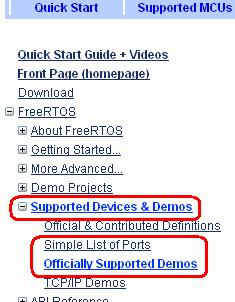
Expand the "Supported Devices & Demos" menu item, then click the "Officially Supported Demos" link (see image on right) to view a list of microcontroller vendors that are supported by FreeRTOS. Clicking a microcontroller vendor name will take you to a list of documentation pages specific to that vendor.
Refer to the Modifying a demo application to run on different hardware page should a pre-configured port not be available for your development board.
Follow the instruction on the RTOS port documentation page to locate the required project within the FreeRTOS directory structure, then open and build the demo project.
Follow the instructions on the RTOS port documentation page to setup the target hardware, download and execute the demo application. The same documentation page will provide information on the functionality of the demo application so you know if it is executing correctly or not.
That is it!
Next steps - further reading
The simplest way to create your own FreeRTOS application is to base it on the demo application that is provided for your chosen port. Once you have the demo application
running, incrementally remove the demo functions and source files and replace them with your own application code.
Following are some shortcuts to valuable information for the serious developer: