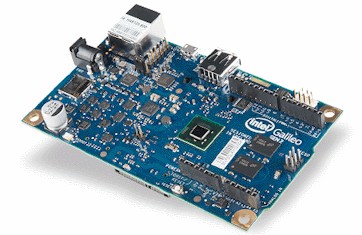
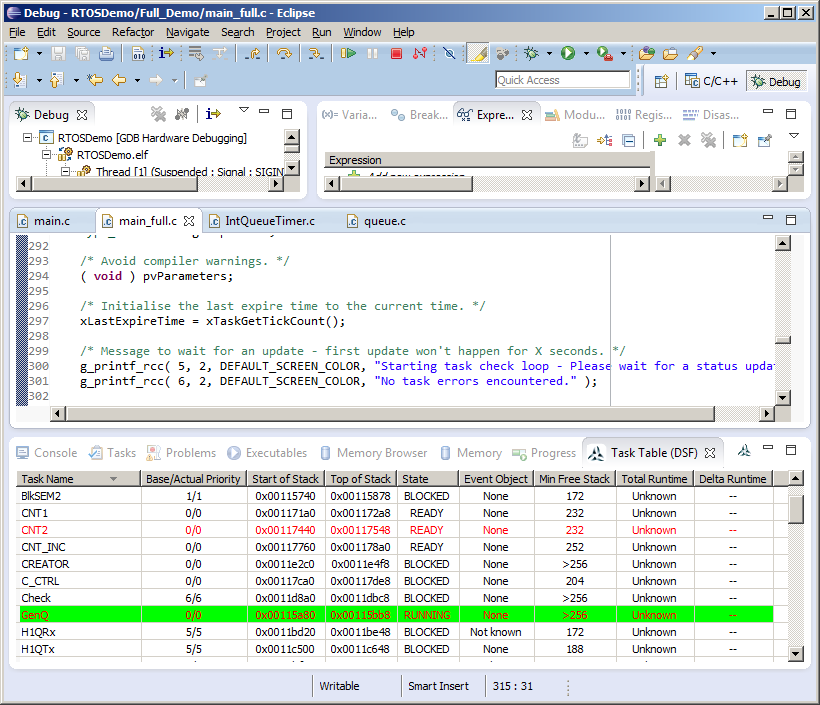
The FreeRTOS IA32 port implements a full interrupt nesting model, utilises a separate system stack to save RAM, and never globally disables interrupts (although the hardware itself disables interrupts on interrupt entry).
Source Code Organisation
Only a small subset of the files in the FreeRTOS .zip file download are are
required by the Intel Quark SoC demo. The Source Code Organization page describes
the structure of the FreeRTOS zip file download.
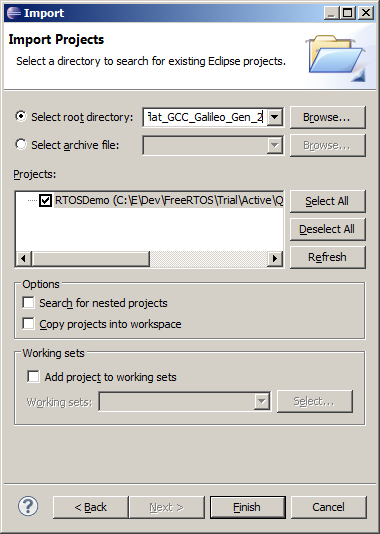
The Eclipse project used to build and debug the demo is located in the FreeRTOS/Demo/IA32_flat_GCC_Galileo_Gen_2 directory. Note the RTOS project includes files from elsewhere in the directory structure, so the project may not build if the directory structure has been altered.
The UART uses 115200 baud, no parity bits, and 8 data bits, and one stop bit.
The 'queue send' task sends the value 100 to the queue every 200 milliseconds.
The 'queue receive' task reads values from the queue, toggling an LED and writing the LED state to the UART, each time the value 100 is received.
If the simple blinky demo is functioning correctly then the LED will toggle every 200 milliseconds.
Included in the full demo is a 'check' task. The check task periodically monitors all the other tasks in the demo before toggling an LED and printing a status code to the UART. If the LED toggles every five seconds, and the printed status code is 0, then the check task has not detected any unexpected behaviour. If the LED toggles every second, then the check task has detected unexpected behaviour, and the source of the potential error is latched in the status code value - the meaning of the status code can be determined by inspecting the implementation of prvCheckTask() within the main_full.c source file.
Note the demo was developed and tested on a Windows host. Any issues building the demo on a Linux host will most likely to be related to the case of letters used in include file names, or include paths. Please report any such errors so they can be corrected.
To build the RTOS demo application:
NOTE: It has been discovered that the above referenced compiler has dependencies on DLLs that are not part of the compiler package. The simplest way around this is to also install the MingW compiler, and ensure the MingW bin directory is also in your path, as that comes with the necessary dll files. If anybody is aware of an elf compiler that doesn't have this external dependency then please let us know.
COFF compilers (such and MingW), can also be used to build the example, but will probably require adjustments to the project settings, and will not offer such a good debugging experience.
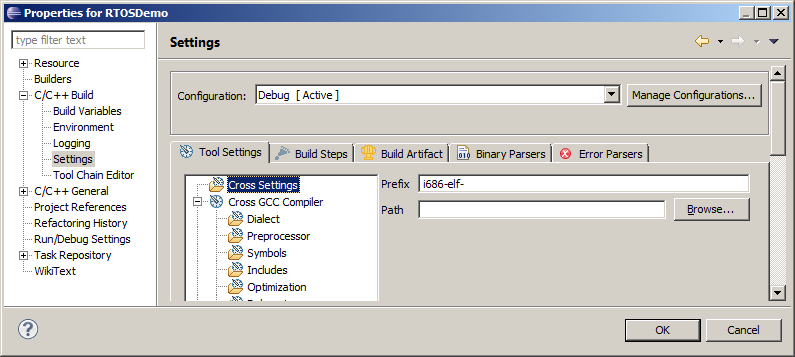
Select "Properties" from the IDE's "Project" menu to bring up the properties dialogue box. In the dialogue box select "C/C++Build->Settings->Cross Settings", then set the name, and if necessary the path, to the compiler that will be used.
Build trouble shooting tips:
|
|
|
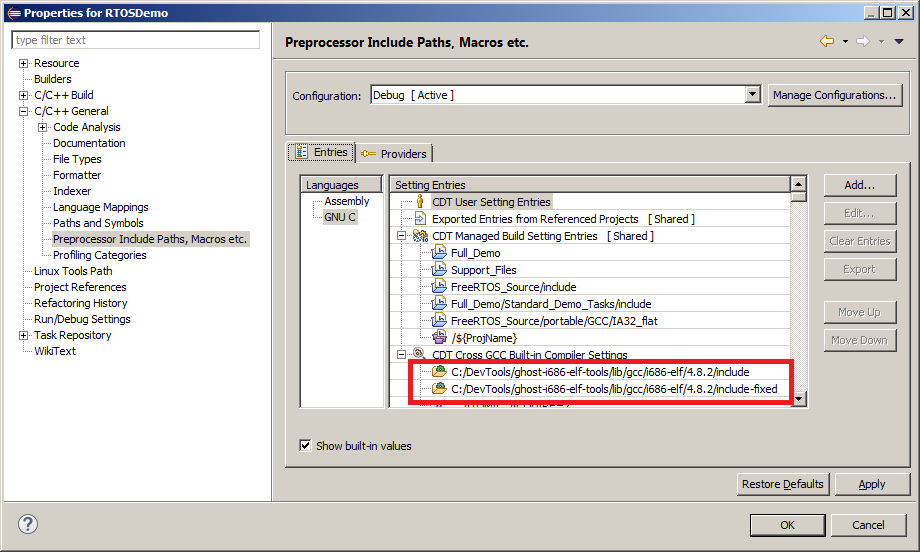
Project options that should get set automatically
|
|
If you receive errors such as "Symbol NULL could not be resolved" or "Type size_t could not be resolved" then it is likely you will have to set the path to the header files manually in the project options.
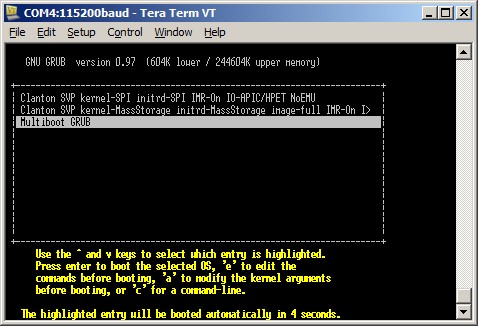
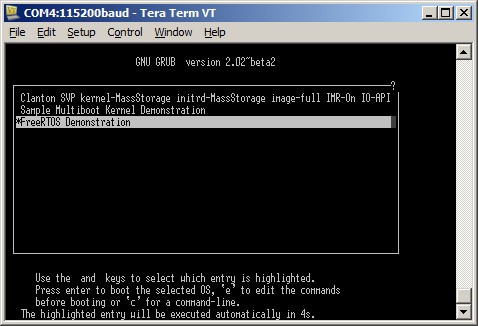
Full instructions for creating the GRUB image are provided in the pdf file provided on this link. For simplicity, a pre-built SD card image is also provided on this link. Brief instructions on using the pre-built SD card image are provided below. Refer to the pdf file for full instructions.
It may be necessary to update the Galileo firmware before proceeding - instructions for updating the firmware are provided in the same pdf file.
The SD card must be formatted as FAT or FAT32, be 32G bytes or smaller, and SDHC format. SDXC format is not supported.
To update the RTOS demo elf file using SCP:
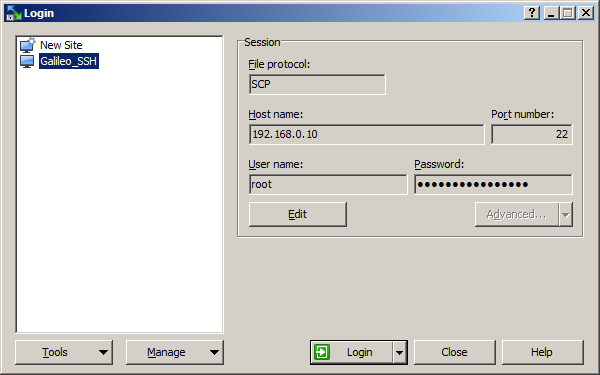
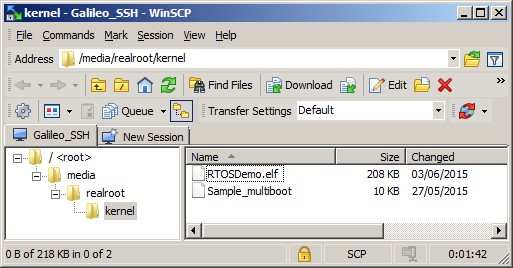
These instructions download an image to RAM only, so the updated image will not be persistent, and will not be available after the Galileo has been reset.
To download a new RTOS demo executable to RAM, then start a debug session:
openocd.exe -f ..\scripts\interface\ftdi\olimex-arm-usb-ocd-h.cfg
                                         -f ..\scripts\board\quark_x10xx_board.cfg
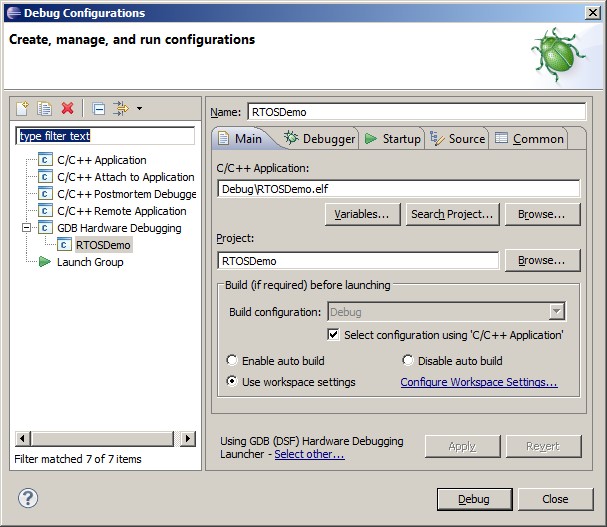
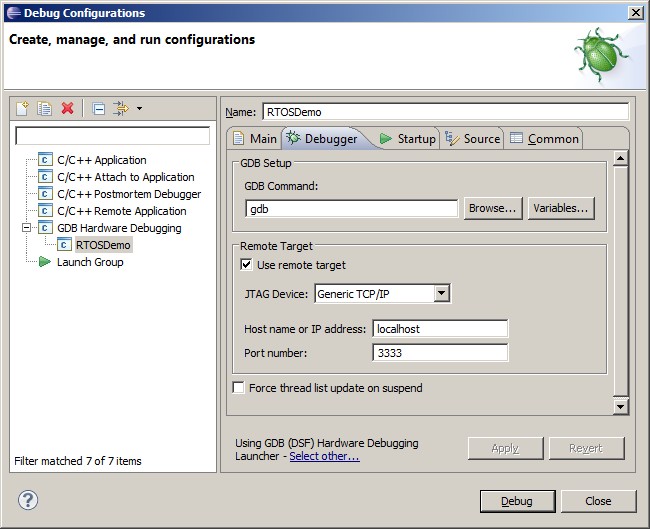
Creating a debug configuration - step 2
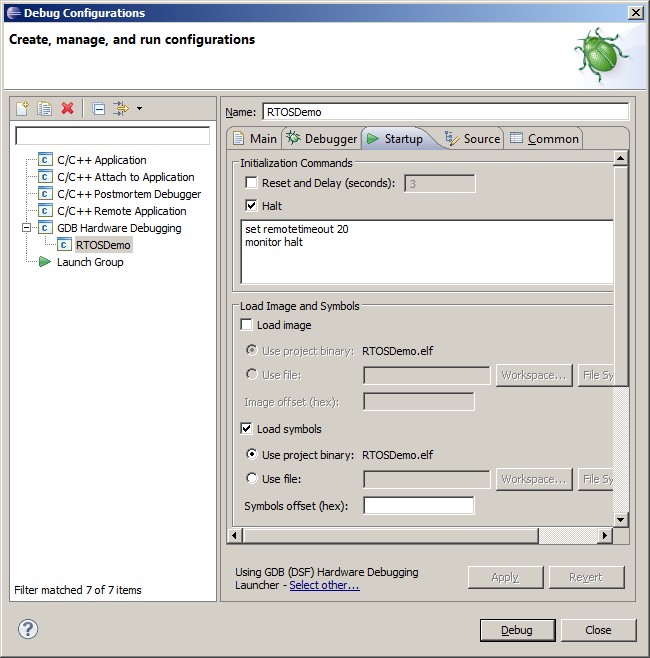
Creating a debug configuration - step 3.
Options that are
not visible in the image are left empty
monitor reg eflags 0x0
flushregs
echo Downloading elf file.  Please wait.
monitor load_image C:[enter path]/RTOSDemo.elf 0
symbol-file C:[enter path]/RTOSDemo.elf
set $eip=_restart
c
The RTOS demo elf file should download to RAM, which takes some time, and then start executing.
The following Intel IA32 target specific constants are required in addition to the standard FreeRTOS configuration constants:
FreeRTOS will switch the stack in use to a dedicated interrupt/system stack on interrupt entry. configISR_STACK_SIZE defines the number of 32-bit values that can be stored on the system stack, and must be large enough to hold a potentially nested interrupt stack frame.
Using a separate system stack means the stacks allocated to tasks can all be smaller, as they do not each need to include space for a nested interrupt stack frame.
Changing this parameter necessitates a complete clean and rebuild to ensure the assembly files are also re-built.
If configSUPPORT_FPU is set to 1 then tasks can opt to have a floating point context (the floating point registers will be saved as part of the task context).
Tasks are not created with an FPU context and must not use any FPU instructions
until after they have called vPortTaskUsesFPU().
If configSUPPORT_FPU is set to 0 then floating point instructions must
never be used.
Changing this parameter necessitates a complete clean and rebuild to ensure the assembly files are also re-built.
If configUSE_COMMON_INTERRUPT_ENTRY_POINT is set to 0 then all interrupt service routines need a short assembly code entry point. The assembly code wraps the interrupt handler in the FreeRTOS portFREERTOS_INTERRUPT_ENTRY and portFREERTOS_INTERRUPT_EXIT macros, which handle interrupt entry and exit respectively. See the Interrupt Service Routines section for an example.
If configUSE_COMMON_INTERRUPT_ENTRY_POINT is set to 1, then interrupt service routines can also be written as standard C functions, in which case interrupt entry and exit is handled by common code within the FreeRTOS port layer. See the Interrupt Service Routines section for an example.
Writing an interrupt handler that provides its own assembly file wrapper is slightly more complex than using the common interrupt entry point, but interrupt entry will be faster and always deterministic.
The FreeRTOS Quark port implements a full interrupt nesting model.
Interrupts that are assigned a priority at or below configMAX_API_CALL_INTERRUPT_PRIORITY can call interrupt safe API functions and will nest.
Interrupts that are assigned a priority above configMAX_API_CALL_INTERRUPT_PRIORITY cannot call any FreeRTOS API functions, will nest, and will not be masked by FreeRTOS critical sections (although all interrupts are briefly masked by the hardware itself on interrupt entry).
FreeRTOS functions that can be called from an interrupt are those that end in "FromISR". FreeRTOS maintains a separate interrupt safe API to enable interrupt entry to be shorter and faster, and to enable all API functions to be simpler and smaller.
User definable interrupt priorities range from 2 (the lowest) to 15 (the highest).
This method can only be used if configUSE_COMMON_INTERRUPT_ENTRY_POINT is set to 1. The interrupt handler must be installed using the xPortRegisterCInterruptHandler() function. /* * pxHandler: Pointer to the function that implements the ISR. * ulVectorNumber: The interrupt vector number to which the ISR will be * assigned. Vector numbers can be between 34 (in the * lowest priority group) and 255 (in the highest priority * group). */ BaseType_t xPortRegisterCInterruptHandler( ISR_Handler_t pxHandler, uint32_t ulVectorNumber ); The xPortRegisterCInterruptHandler() function prototype
This is the simplest of the two methods, but incurs a slightly longer
interrupt entry time. Interrupts are enabled before the ISR (the C function)
is called.
The example below is a cut-down version of an interrupt used in the RTOS demo project. /* The function that implements the ISR is a standard C function. */ static void vHPETIRQHandler0( void ) { /* Perform ISR processing here. */ /* Clear the interrupt in the IP API. It is not necessary to clear the interrupt in the local API - that is done by FreeRTOS. */ hpetIO_APIC_EOI = hpetHPET_TIMER0_ISR_VECTOR; } /*-----------------------------------------------------------*/ /* The C function is then installed as the handler for vector 100 using the following code. */ xPortRegisterCInterruptHandler( vHPETIRQHandler0, 100 ); Implementing an ISR as a standard C function
The assembly code wraps the interrupt handler in the FreeRTOS provided portFREERTOS_INTERRUPT_ENTRY and portFREERTOS_INTERRUPT_EXIT macros. The interrupt handler must be installed using the xPortInstallInterruptHandler() function. /* * pxHandler: Pointer to the assembly code stub that wraps the ISR. * ulVectorNumber: The interrupt vector number to which the ISR will be * assigned. Vector numbers can be between 34 (in the * lowest priority group) and 255 (in the highest priority * group). */ BaseType_t xPortInstallInterruptHandler( ISR_Handler_t pxHandler, uint32_t ulVectorNumber ); The xPortInstallInterruptHandler() function prototype
This method can always be used. It is slightly more complex than
method 1, but benefits from a faster and deterministic interrupt entry time.
The application writer can re-enable interrupt before calling the C portion
of the ISR if desired.
The example below is a cut-down version of an interrupt used in the RTOS demo project. /* The function that implements the C portion of the ISR. This is the function called from the assembly code wrapper. */ void vHPETIRQHandler1( void ) { /* Perform ISR processing here. */ /* Clear the interrupt in the IP API. It is not necessary to clear the interrupt in the local API - that is done by FreeRTOS. */ hpetIO_APIC_EOI = hpetHPET_TIMER1_ISR_VECTOR; } /*-----------------------------------------------------------*/ /* The assembly code wrapper that calls the C function shown immediately above. The wrapper must be implemented in an assembly file, not a C file. The interrupt entry point assembly code makes use of the portFREERTOS_INTERRUPT_ENTRY and portFREERTOS_INTERRUPT_EXIT macros, so ISR_Support.h must be included. ISR_Support.h is located in the FreeRTOS/source/portable/GCC/IA32_flat directory. */ #include "ISR_Support.h" .align 4 .func vApplicationHPETTimer1Wrapper .extern vHPETIRQHandler1 vApplicationHPETTimer1Wrapper: /* FreeRTOS macro that handles interrupt entry. Must be called first. */ portFREERTOS_INTERRUPT_ENTRY /* It is safe to enable interrupts here, if desired. */ sti /* The rest of the ISR is implemented in C. Call the C function now. */ call vHPETIRQHandler1 /* FreeRTOS macro that handles interrupt exit. Must be called last. */ portFREERTOS_INTERRUPT_EXIT .endfunc /*-----------------------------------------------------------*/ /* Finally, the assembly code wrapper is then installed as the handler for vector 100 using the following code. This code must be in a C file. */ extern void vApplicationHPETTimer1Wrapper( void ); xPortInstallInterruptHandler( vApplicationHPETTimer1Wrapper, 100 ); The C function called from the assembly code wrapper
If an ISR causes an RTOS task of equal or higher priority than the currently executing
task to leave the Blocked state (see the description of the pxHigherPriorityTaskWoken
parameter in the API documentation for functions such as
xSemaphoreGiveFromISR())
then the ISR must request a context switch before
the ISR exits if it wants the unblocked task to execute immediately. When this
is done, the interrupt will interrupt one RTOS task, but return to a different
RTOS task.
The macro portYIELD_FROM_ISR() (or portEND_SWITCHING_ISR()) is used to request a context switch from within an ISR. The following source code snippet is provided as an example. The ISR in the example uses a task notification to synchronise with a task (not shown), and calls portYIELD_FROM_ISR() to ensure the interrupt returns directly to the unblocked task.
The application writer may choose not to call portYIELD_FROM_ISR() if it is known that the interrupt did not necessitate any immediate processing - for example, if the interrupt was a character arriving, but more characters are needed before the message being received is complete and ready for processing.
void Dummy_IRQHandler( void )
{
long lHigherPriorityTaskWoken = pdFALSE;
/* Clear the interrupt if necessary. */
Dummy_ClearITPendingBit();
/* This interrupt does nothing more than demonstrate how to synchronise a
task with an interrupt. A task notification is used for this purpose.
Note lHigherPriorityTaskWoken is initialised to pdFALSE. */
vTaskNotifyGiveFromISR( xTaskHandle, &lHigherPriorityTaskWoken );
/* If the notified task was blocked waiting for the notification, and the
unblocked task has a priority higher than or equal to the currently Running
task (the task that this interrupt interrupted), then
lHigherPriorityTaskWoken will have been set to pdTRUE internally within
vTaskNotifyGiveFromISR(). Passing pdTRUE into the portYIELD_FROM_ISR() macro
will result in a context switch being pended to ensure this interrupt returns
directly to the unblocked, higher priority, task. Passing pdFALSE into
portYIELD_FROM_ISR() has no effect. */
portYIELD_FROM_ISR( lHigherPriorityTaskWoken );
}
An example interrupt handler
Only FreeRTOS API functions that end in "FromISR" can be called from an
interrupt service routine - and then only if the priority of the interrupt
is less than or equal to that set by the configMAX_API_CALL_INTERRUPT_PRIORITY
configuration constant.