 |
|
|
The demo documented on this page is deprecated as it has been superseded by demos that use later hardware and tool versions.
The port and demo project were developed and tested using the 'Large' and 'Small' data models, and the 'Large' and 'Small' code models.
The demo LCD task is the only task that is permitted to access the LCD, so is the LCD 'gatekeeper'. Other tasks and interrupts that want to write strings to the LCD do not access the LCD directly, but instead send the string they wish to display to the LCD task using a FreeRTOS queue.
The LCD task also demonstrates the 'controller' task design pattern. Messages that are sent to the LCD are structures that contain both a message type and a message value parameter. The LCD task knows what to do with the message value (which can be an integer, character pointer, or anything else) by first inspecting the message type.
A button polling task uses the vTaskDelay() FreeRTOS API function to control the rate at which it reads a button input. This removes the need for complex button debouncing, as well as preventing the task from utilising all of the available processing time.
Slow output devices such as LCDs cannot normally be accessed efficiently from an interrupt service routine. In this demo the joystick select button is used to generate an external interrupt, and the interrupt service routine sends a string to the LCD indirectly by sending it to the LCD task on a message queue. This is using the LCD task as a 'gatekeeper' task as described above.
The demo makes use of the idle task hook to place the processor into a low power state. Note however that the demo is implemented using standard task implementations that are used by many different demos, and is therefore not optimised for low power operation. Lower power consumption would be achieved by converting polling tasks into event driven tasks, and slowing the tick interrupt frequency, etc.
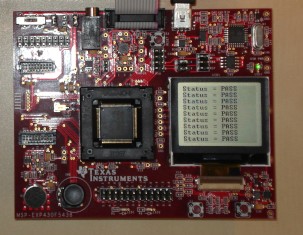
The demo makes use of a software timer to implement 'watchdog' type functionality. It periodically monitors all the other tasks in the system to look for any unexpected behaviour. It then sends either a PASS or an error code status message to the LCD/Controller task. The LCD/Controller demo task uses the message type member of the message it receives to interpret the message as a status message, then uses the message value member of the same message to determine which status string it should write to the LCD.
The demo application also creates the standard software timer test task, which is part of the set of standard demo tasks.
The malloc() failed hook will be called when a call to pvPortMalloc() fails because there is not enough FreeRTOS heap memory available for the allocation to complete. pvPortMalloc() can be called from application tasks, but is also called from FreeRTOS API functions that create tasks, queues and semaphores.
xPortGetFreeHeapSize() is called from a task after the RTOS scheduler has been started and outputs the amount of FreeRTOS heap memory that remains unallocated (the amount of heap memory that is still available) to the LCD.
See also the FAQ My application does not run, what could be wrong?
The CCS project file for the MSP430F5438 demo is located in the FreeRTOS/Demo/MSP430X_MSP430F5438_CCS4 directory. This is the project that should be imported into the CCS workspace. The Preparing the Eclipse project section below contains important information on setting up the demo project directory, and importing the demo project into Code Composer Studio.
Note that the implementation of the UART interrupt service routine is provided to demonstrate the use of queues from inside an interrupt service routine. It is not intended to be an example of an efficient interrupt implementation. A real application should make use of the DMA. Or, as a minimum, transmission and reception could use a simple RAM ring buffer, and synchronise with a task using a semaphore when a complete message has been received or transmitted.
The port was developed and tested using a Texas Instruments MSP-FET430UIF USB debug interface.
Preparing the CCS (Eclipse) project directory
Eclipse projects can be either standard makefile projects, or managed make projects.
The MSP430X CCS4 project uses a managed make project. This in turn means that
either:
CreateProjectDirectoryStructure.bat must be executed before the Code Composer Studio project is imported into the Eclipse workspace.
CreateProjectDirectoryStructure.bat cannot be executed from within the Code Composer Studio Eclipse IDE.
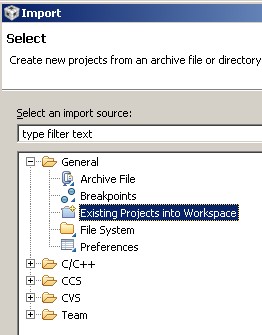
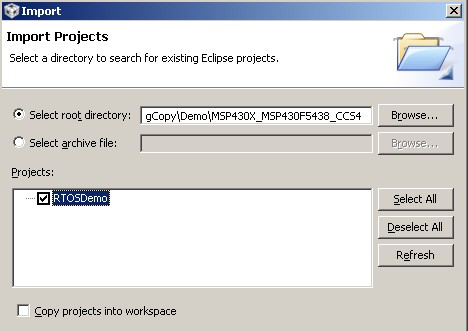
The CCS4 project contains four build configurations. All the build configurations demonstrate the same functionality, but with different run time models and optimisation settings as described in the table below.
| Build configuration | Description |
| Debug_Large_Data_Model | Configured to use the large data model, the large code model, and with zero optimisation |
| Release_Large_Data_Model | Configured to use the large data model, the large code model, and with maximum optimisation. |
| Debug_Small_Data_Model | Configured to use the small data model, the large code model, and with zero optimisation. |
| Debug_Small_Data_Small_Code_Model | Configured to use the small data model, the small code model, and with zero optimisation. |
The following behaviour will be observed when the demo is executing correctly:
void vApplicationSetupTimerInterrupt( void );
The constant configTICK_VECTOR must be set to the interrupt vector number of the chosen peripheral. configTICK_VECTOR is defined in the FreeRTOSConfig.h header file. This demo project includes an implementation of vApplicationSetupTimerInterrupt() that configures time TA0 to generate the tick interrupt and therefore sets configTICK_VECTOR to TIMER0_A0_VECTOR. The provided code will have to be modified only if the application being developed needs TA0 to be free for some other purpose.
This sets the frequency of the RTOS tick interrupt. The supplied value of 1000Hz is useful for testing the RTOS kernel functionality but is faster than most applications require. Lowering this value will improve efficiency.
Each port #defines 'BaseType_t' to equal the most efficient data type for that processor. This port defines BaseType_t to be of type short.
Note that vPortEndScheduler() has not been implemented.
This demo project provides examples of FreeRTOS interrupt service routines - namely prvSelectButtonInterrupt() defined in main.c and prvUSCI_A0_ISR() defined in serial.c. Note that prvUSCI_A0_ISR() is implemented to stress the port and demonstrate queues being used from interrupts - it is not intended to be a demonstration of an efficient or a generic interrupt service routine!