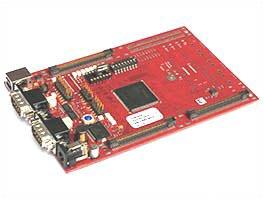
Infineon TriBoard TC1782 starter kit
This page documents the FreeRTOS demo application for the Infineon TriCore processor. The demo application uses the Free TriCore Entry Tool Chain, which consists of the HighTec GCC build tools, and a debugger, both of which are integrated into an Eclipse based environment.
The demo project is pre-configured to run on the Infineon TriBoard TC1782 starter kit, which is fitted with a TC1782 processor.
The FreeRTOS TriCore port supports a full interrupt nesting model, and does not completely disable interrupts, other than where architectural constrains necessitate it for correct assembly instruction sequencing purposes.
This demo application demonstrates:
See also the FAQ My application does not run, what could be wrong?
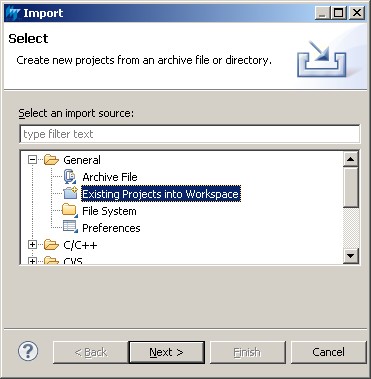
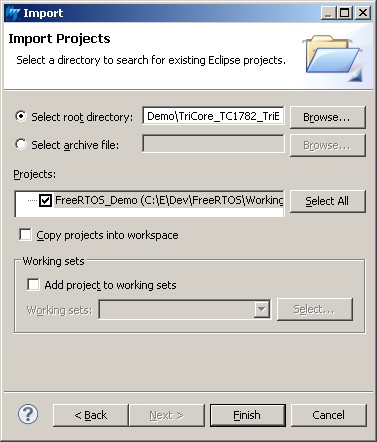
The TriCore demo Eclipse project is located in the FreeRTOS/Demo/TriCore_TC1782_TriBoard_GCC directory, but the directory requires a preparation step before the project can be imported into an Eclipse workspace.
Preparing the Eclipse project directory
Eclipse projects can be either standard makefile projects, or managed make projects.
The official FreeRTOS TriCore demo project is a managed make project. This means that
either:
CreateProjectDirectoryStructure.bat must be executed before the FreeRTOS demo project is imported into the Eclipse workspace.
The files that the batch file copies are:
Demo application tasks are split between standard demo tasks, and demo specific tasks. Standard demo tasks are used by all FreeRTOS ports and demo applications. They have no purpose other than to demonstrate the FreeRTOS API, and test a port.
|
mainCREATE_SIMPLE_LED_FLASHER_DEMO_ONLY setting
|
Description
|
| Set to 1 | This creates a very simple example that creates three standard demo "flash" tasks. Each of the three tasks toggles an LED at a fixed but different frequency. LEDs P5.0, P5.1 and P5.2 are used. |
| Set to 0 |
This is a very comprehensive demo that creates 42 tasks before
starting the RTOS scheduler, then continuously dynamically creates and
deletes another two tasks as the application executes.
It creates many queues, software timers and different types of semaphore. The tasks consist mainly of the standard demo tasks. The demo also includes application specific "register test" tasks. These are idle priority tasks that start by filling all the generic processor registers with known values, then repeatedly check that each register maintains its expected value, as it gets swapped in and out, for the lifetime of the task. Each of the two register check tasks uses a different set of known values, and a value being unexpectedly changed is symptomatic of an error in the context switching mechanism. Finally, the demo creates an application specific task to check interrupt nesting functionality. The task uses a high priority, high frequency interrupt, to synchronise with a task using a semaphore. Testing has shown that the test generates a nesting depth that is at least three deep, as it nests with the UART interrupt, that itself nests with the RTOS tick interrupt. In theory, as the UART itself uses two interrupts, an extra level of nesting could also occur. A 'check' task is created that periodically inspects the standard demo tasks, register test tasks, and the interrupt nesting test tasks, to ensure they are all operating as expected. The check task toggles LED P5.7 to give visual feedback of the system status. If LED P5.7 toggles every 5 seconds, then the check task has not discovered any potential problems with the execution of the test/demo application. If the rate at which LED P5.7 toggles increases to every 500 milliseconds, then the check task has discovered a potential problem with the behaviour of at least one task. Like the simple flasher demo, the comprehensive demo creates the standard demo flash tasks, which toggle LEDs P5.0, P5.1 and P5.2 at fixed but different frequencies. |
The LEDs used by the demo application are hard wired onto the TriBoard main board, so no explicit hardware setup is required.
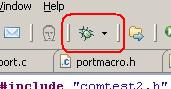
When executing, the full demo application will behave as follows:
Sets the frequency of the RTOS tick. The supplied value of 1000Hz is useful for testing the RTOS kernel functionality, but is faster than needed by most applications. Lowering this frequency will improve efficiency.
Defines the maximum interrupt priority from which FreeRTOS API functions can be called. Interrupts at or below this priority can call FreeRTOS API functions provided that the API function ends in 'FromISR'. Interrupts above this priority cannot call any FreeRTOS API functions, but will not be disabled by the RTOS kernel (over an above the limitations imposed by the architecture mentioned at the top of this file). Interrupts that have a priority above configMAX_SYSCALL_INTERRUPT_PRIORITY are therefore suitable for functionality that requires very high timing accuracy.
The SysCall trap is used by the RTOS kernel, and defined in port.c.
The priorities of the interrupts used by the demo are defined in FreeRTOSConfig.h. Note that interrupt priorities 1 and 2 are used by the RTOS kernel, and must not be used or modified.
Often, an ISR wants to cause a context switch, so the task that the ISR returns to when the ISR processing is completed is different from the task that the ISR originally interrupted. This would be the case if the ISR caused a task to unblock, and the task that was unblocked has a priority above the task in the Running state (the task that was interrupted). The macro portYIELD_FROM_ISR() is provided for this purpose. portYIELD_FROM_ISR() takes a single parameter: If the parameter is zero, a context switch is not performed, if the parameter is non-zero, a context switch is performed. A very simple example of this is found in InterruptNestTest.c, and is replicated below:
static void prvPortHighFrequencyTimerHandler( int iArg )
{
static volatile unsigned long ulExecutionCounter = 0UL;

/* Variable used to determine if a context switch is required.  This must be
initialised to pdFALSE (0). */
unsigned long ulHigherPriorityTaskWoken = pdFALSE;

    /* Clear the interrupt source. */
    STM_ISRR.reg = 1UL << 2UL;

    /* Reload the Compare Match register for X ticks into the future.*/
    STM_CMP1.reg += ulCompareMatchValue;

    /* Note how many times this ISR has executed. */
    ulExecutionCounter++;

    /* Do the number of executions equal the number expected in a 10ms period? */
    if( ulExecutionCounter >= ulInterruptsPer10ms )
    {
        /* Give the semaphore to unblock the task that is synchronising with
        this interrupt.  Giving this semaphore will unblock the task, and if the
        priority of the unblocked task is above that of the task that is currently
        in the Running state (the task that this interrupt interrupted), then
        ulHigherPriorityTaskWoken will be set to true within this function call
        to indicate that a context switch is required. */
        xSemaphoreGiveFromISR( xHighFrequencyTimerSemaphore,
                               &ulHigherPriorityTaskWoken );

        /* Start counting again. */
        ulExecutionCounter = 0UL;
    }

    /* Context switch on exit if necessary.  See the comment above the call to
    xSemaphoreGiveFromISR() just above. */
    portYIELD_FROM_ISR( ulHigherPriorityTaskWoken );
}