 |
|
|
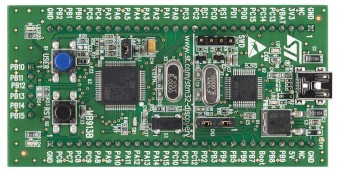
Its low cost makes the discovery board an ideal evaluation platform, but the 8K of RAM available also means there is a limit to the number of FreeRTOS kernel features that can be demonstrated. Therefore, this simple demo only actively demonstrates task, queue, software timer and interrupt functionality. The demo is also configured to include malloc failure, idle, and stack overflow hook functions.
The FreeRTOS download includes other, more fully featured, demonstration applications for larger parts in the STM32 microcontroller family.
The demo is pre-configured to use the free version of the Atollic TrueStudio for STM32 Eclipse based IDE, along with the FreeRTOS GCC port.
See also the FAQ My application does not run, what could be wrong?
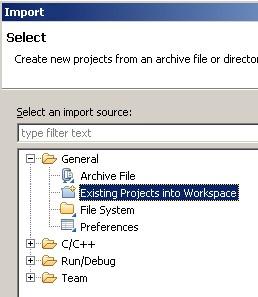
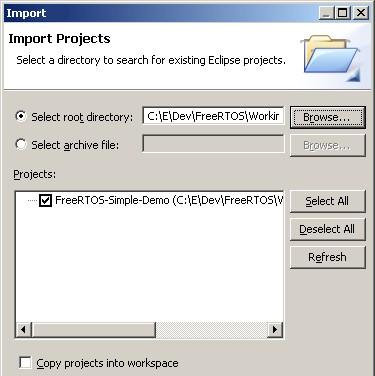
The TrueStudio project for the FreeRTOS STM32 Discovery Board demo is located in the FreeRTOS/Demo/CORTEX_STM32F100_Atollic directory. This is the project that should be imported into the TrueStudio workspace. The Preparing the Eclipse Project section below contains important information on setting up the demo project directory, and importing the demo project into TrueStudio.
Preparing the TrueStudio (Eclipse) project directory
Eclipse projects can be either standard makefile projects, or managed make projects.
The STM32F100 project uses a managed make project. This in turn means that
either:
CreateProjectDirectoryStructure.bat must be executed before the TrueStudio project is imported into the Eclipse workspace.
CreateProjectDirectoryStructure.bat cannot be executed from within the TrueStudio Eclipse IDE.
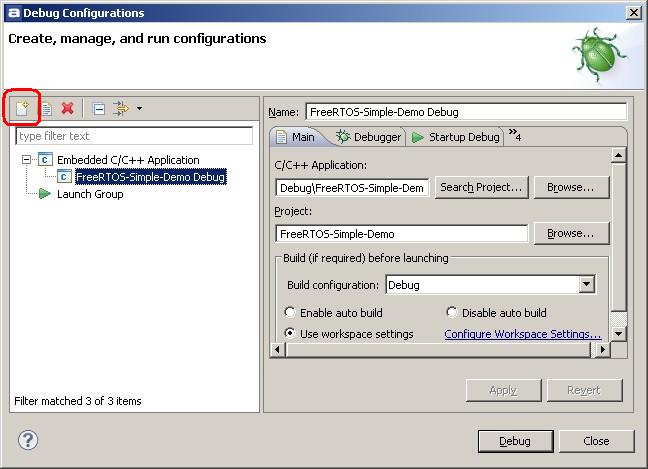
The idle hook function queries the amount of FreeRTOS heap space that is remaining (see vApplicationIdleHook() defined in main.c). The demo application is configured to use 7K of the available 8K of RAM as the FreeRTOS heap. Memory is only allocated from this heap during initialisation, and this demo only actually uses 1.6K bytes of the configured 7K available - leaving 5.4K bytes of heap space unallocated.
main() creates one software timer, one queue, and two tasks. It then starts the scheduler.
The queue send task is implemented by the prvQueueSendTask() function in main.c. prvQueueSendTask() sits in a loop that causes it to repeatedly block for 200 milliseconds, before sending the value 100 to the queue that was created within main(). Once the value is sent, the task loops back around to block for another 200 milliseconds.
The queue receive task is implemented by the prvQueueReceiveTask() function in main_blinky.c. prvQueueReceiveTask() sits in a loop where it repeatedly blocks on attempts to read data from the queue that was created within main(). When data is received, the task checks the value of the data, and if the value equals the expected 100, toggles the green LED. The 'block time' parameter passed to the queue receive function specifies that the task should be held in the Blocked state indefinitely to wait for data to be available on the queue. The queue receive task will only leave the Blocked state when the queue send task writes to the queue. As the queue send task writes to the queue every 200 milliseconds, the queue receive task leaves the Blocked state every 200 milliseconds, and therefore toggles the green LED every 200 milliseconds.
The user button B1 is configured to generate an interrupt each time it is pressed. The interrupt service routine switches the red LED on, and resets the LED software timer. The LED timer has a 5000 millisecond (5 second) period, and uses a callback function that is defined to just turn the red LED off. Therefore, pressing the user button will turn the red LED on, and the LED will remain on until a full five seconds pass without the button being pressed.
This sets the frequency of the RTOS tick interrupt. The supplied value of 1000Hz is useful for testing the RTOS kernel functionality but is faster than most applications require. Lowering this value will improve efficiency.
See the RTOS kernel configuration documentation for full information on these configuration constants.
Attention please!: Remember that ARM Cortex-M3 cores use numerically low priority numbers to represent HIGH priority interrupts. This can seem counter-intuitive and is easy to forget! If you wish to assign an interrupt a low priority do NOT assign it a priority of 0 (or other low numeric value) as this will result in the interrupt actually having the highest priority in the system - and therefore potentially make your system crash if this priority is above configMAX_SYSCALL_INTERRUPT_PRIORITY. Also, do not leave interrupt priorities unassigned, as by default they will have a priority of 0 and therefore the highest priority possible.
The lowest priority on a ARM Cortex-M3 core is in fact 255 - however different Cortex-M3 vendors implement a different number of priority bits and supply library functions that expect priorities to be specified in different ways. For example, on the STM32 the lowest priority you can specify in an ST driver library call is in fact 15 - this is defined by the constant configLIBRARY_LOWEST_INTERRUPT_PRIORITY in FreeRTOSConfig.h. The highest priority that can be assigned is always zero.
It is also recommended to ensure that all four priority bits are assigned as being premption priority bits. This can be ensured by passing "NVIC_PriorityGroup_4" into the ST library function NVIC_PriorityGroupConfig(). In the demo project this is done from the function prvSetupHardware(), which is itself defined in main.c.
Each port #defines 'BaseType_t' to equal the most efficient data type for that processor. This port defines BaseType_t to be of type long.
Note that vPortEndScheduler() has not been implemented.
Note that portEND_SWITCHING_ISR() will leave interrupts enabled.
This demo project provides an example interrupt service routines - namely EXTI0_IRQHandler() defined in main.c.
Note that the following lines are included in FreeRTOSConfig.h:
	#define vPortSVCHandler      SVC_Handler
	#define xPortPendSVHandler   PendSV_Handler
	#define xPortSysTickHandler  SysTick_Handler
These definitions map the FreeRTOS kernel interrupt handler function names onto the CMSIS interrupt handler functions names - and in so doing, allow the Atollic provided linker script and start up files to be used without modification.