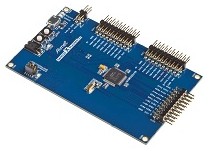
SAMD20 Xplained PRO |
|
SAMD20 Xplained PRO |
Commercial licenses for FreeRTOS+CLI are provided free to Atmel SAM users!
The project uses the FreeRTOS ARM Cortex-M0 GCC port, builds with the free Atmel Studio IDE (which uses the Visual Studio framework and includes a kernel aware FreeRTOS plug-in), and targets the very low cost SAMD20 Xplained Pro evaluation board.
The command line interface character input and output uses drivers provided by Atmel in their Atmel Software Framework (ASF).
A #define is used to switch the build between a simple blinky style application, and a comprehensive test and demo application that incorporates the FreeRTOS+CLI component.
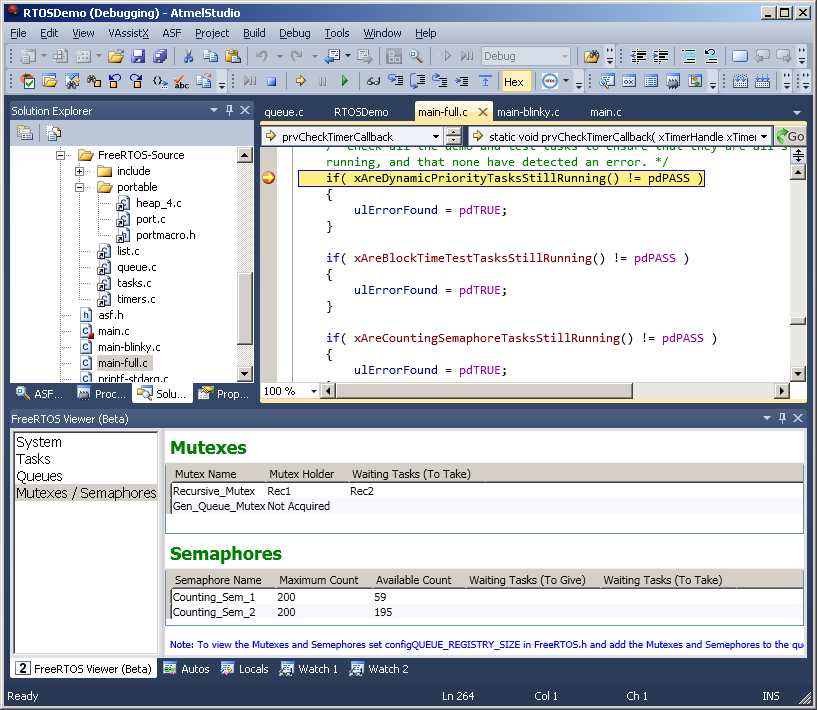
See also the FAQ My application does not run, what could be wrong?
The Atmel Studio solution file is called RTOSDemo.atsln, and is located in the FreeRTOS/Demo/CORTEX_M0+_Atmel_SAMD20_Xplained directory.
main_blinky() creates one queue, and two tasks. It then starts the scheduler.
The queue send task is implemented by prvQueueSendTask() in main_blinky.c.
prvQueueSendTask() repeatedly blocks for 200 milliseconds before sending the value 100 to the queue that was created in main_blinky().
The queue receive task is implemented by prvQueueReceiveTask() in main_blinky.c.
prvQueueReceiveTask() repeatedly blocks on attempts to read from the queue that was created in main_blinky(), toggling the LED each time data is received. The queue send task sends data to the queue every 200 milliseconds, so the LED will toggle every 200 milliseconds.
main_full() creates a set of standard demo tasks, some application specific test tasks, a task that manages FreeRTOS+CLI, and a timer. It then starts the scheduler.
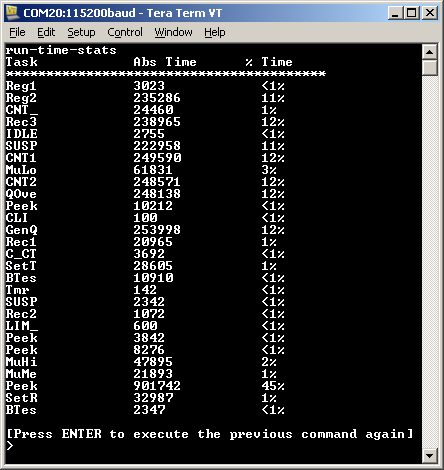
The image shows COM 20 being used, but it is likely that the virtual COM port will enumerate to a different port number on your host computer.
As always with FreeRTOS+CLI, the 'help' command will display a list of registered (and therefore available) commands. The image was captured after executing the 'run-time-stats' command, which generates a table showing the amount of CPU time that has been consumed by each RTOS task.
These fill the registers with known values, then check that each register maintains its expected value for the lifetime of the task. Each task uses a different set of values. A register containing an unexpected value is indicative of an error in the context switching mechanism.
The check software timer period is initially set to three seconds. Its callback function checks that all the standard demo tasks, and the register check tasks, are not only still executing, but are executing without reporting any errors. If the check timer callback discovers that a task has either stalled, or reported an error, then it changes the period of the check timer from the initial three seconds, to just 200ms. The callback function also toggles the LED to give a visual indication of the system status: If the LED is toggling every three seconds then no issues have been discovered. If the LED is toggling every 200ms, then a problem has been discovered in at least one task.
Note that portEND_SWITCHING_ISR() will leave interrupts enabled.
A dummy interrupt handler called Dummy_IRQHandler() is provided at the end of main.c as a reference implementation. Dummy_IRQHandler() is also replicated below.
void Dummy_IRQHandler(void)
{
long lHigherPriorityTaskWoken = pdFALSE;

    /* Clear the interrupt if necessary. */
    Dummy_ClearITPendingBit();

    /* This interrupt does nothing more than demonstrate how to synchronise a
    task with an interrupt.  A semaphore is used for this purpose.  Note
    lHigherPriorityTaskWoken is initialised to zero. Only FreeRTOS API functions
    that end in "FromISR" can be called from an ISR! */
    xSemaphoreGiveFromISR( xTestSemaphore, &lHigherPriorityTaskWoken );

    /* If there was a task that was blocked on the semaphore, and giving the
    semaphore caused the task to unblock, and the unblocked task has a priority
    higher than the current Running state task (the task that this interrupt
    interrupted), then lHigherPriorityTaskWoken will have been set to pdTRUE
    internally within xSemaphoreGiveFromISR().  Passing pdTRUE into the
    portEND_SWITCHING_ISR() macro will result in a context switch being pended to
    ensure this interrupt returns directly to the unblocked, higher priority,
    task.  Passing pdFALSE into portEND_SWITCHING_ISR() has no effect. */
    portEND_SWITCHING_ISR( lHigherPriorityTaskWoken );
}
Note that the following lines are included in FreeRTOSConfig.h to map the FreeRTOS interrupt handler function names onto the CMSIS interrupt handler function names. This allows the linker scripts provided by the compiler tool vendors to be used without modification.
	#define vPortSVCHandler      SVC_Handler
	#define xPortPendSVHandler   PendSV_Handler
	#define xPortSysTickHandler  SysTick_Handler
This sets the frequency of the RTOS tick interrupt. The supplied value of 500Hz is useful for testing the RTOS kernel functionality, but is faster than most applications require. Lowering this value will improve efficiency.
Each port #defines 'BaseType_t' to equal the most efficient data type for that processor. All ARM Cortex-M0+ ports define BaseType_t to be of type long.
Note that vPortEndScheduler() has not been implemented.